
dr.fone - Recovery & Transfer wirelessly & Backup3.2.4.195 - Google Play
You'll be able to see results in few seconds.
Publisher Description



★ Highest recovery rate in the industry.
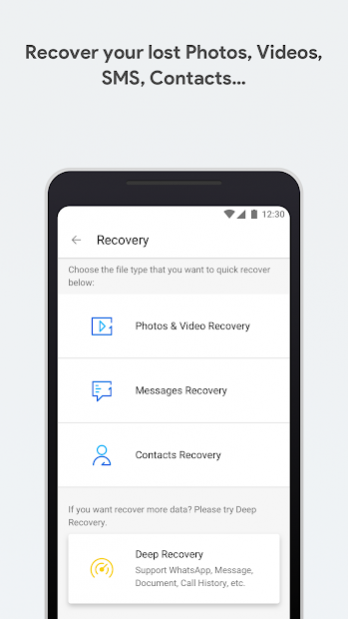
★ Recover photos, videos, contacts, messages, notes, call logs, and more.
♥
New feature: Easily transfer any files between devices and PC wirelessly
★ Free you from cables and client.
★ The only thing you need to do is to open
web.drfone.me
in a browser.
【
The main function of dr.fone
】
►
Recovery feature
Important: Deleted data may be overwritten by new data. This will affect the outcome of data recovery. The sooner you act the better the results you’ll get.
>
Recover from Cache (No rooting necessary!*)
Support recover photos and videos from cache, thumbnails, memory card and internal memory.
>
Recover Photos & videos, Message, Contacts (Rooting necessary!*)
Support scan and recover from all of your device’s internal and external memory
Supported photo formats: JPG, PNG, BMP, GIF, TIF,TIFF.
Supported video formats: MP4 (Taken by Camera) , 3GP, MOV, AVI, MPG, WMV, ASF, FLV, RM/RMVB, M4V, 3G2, SWF.
Support save the recovered contacts as .csv file
>
Deep Recovery (Need to work with dr.fone desktop version)
:
Deep Recovery supports more data loss scenarios, like accidentally deleted data/ rooting errors / OS update / system crash, .etc.
Support recover photos, videos, contacts, messaging, call logs, Audio, document, WhatsApp messages & Attachment .
►
Transfer feature
:
Easily transfer any files between devices and PC wirelessly.
The only thing you need to do is to open
web.drfone.me
in a browser.
Free you from cables and client.
Notes: you need to Keep your device and computer under the same network(or the same Wi-fi).
►
Recycle Bin (No rooting necessary!*)
:
It’s just like the recycle bin on your windows or mac desktop computer. Move the photos and videos to the Recycle Bin when you delete them, you can restore them anytime you want.
Customize the retention period for deleted files.
►
Other feature (Need to work with dr.fone desktop version)
★ Root -- Highest success rate in the industry and 100% safe and secure.
★ Clone -- 1-Click Phone to Phone Transfer contacts, text messages, photos and other file types
★ Backup -- Selectively backup Android data to computer with one click.
【
LIKE US and STAY CONNECTED
】
► Official Site : https://drfone.wondershare.com
► Facebook:https://www.facebook.com/drfonetoolkit/
About dr.fone - Recovery & Transfer wirelessly & Backup
The company that develops dr.fone - Recovery & Transfer wirelessly & Backup is WONDERSHARE TECHNOLOGY CO., LIMITED. The latest version released by its developer is 3.2.4.195.
To install dr.fone - Recovery & Transfer wirelessly & Backup on your Android device, just click the green Continue To App button above to start the installation process. The app is listed on our website since 2021-03-19 and was downloaded 0 times. We have already checked if the download link is safe, however for your own protection we recommend that you scan the downloaded app with your antivirus. Your antivirus may detect the dr.fone - Recovery & Transfer wirelessly & Backup as malware if the download link to com.wondershare.drfone is broken.
How to install dr.fone - Recovery & Transfer wirelessly & Backup on your Android device:
- Click on the Continue To App button on our website. This will redirect you to Google Play.
- Once the dr.fone - Recovery & Transfer wirelessly & Backup is shown in the Google Play listing of your Android device, you can start its download and installation. Tap on the Install button located below the search bar and to the right of the app icon.
- A pop-up window with the permissions required by dr.fone - Recovery & Transfer wirelessly & Backup will be shown. Click on Accept to continue the process.
- dr.fone - Recovery & Transfer wirelessly & Backup will be downloaded onto your device, displaying a progress. Once the download completes, the installation will start and you'll get a notification after the installation is finished.
Program Details
System requirements
Download information
Pricing
Version History
version 3.2.4.195
posted on 2021-03-19
Fixed some bugs
version 3.2.1.192
posted on 2020-05-18
The easiest way to send and receive between devices and computers.Add new features, support WAN transmission.
Disclaimer
Official Google Play Link
We do not host dr.fone - Recovery & Transfer wirelessly & Backup on our servers. We did not scan it for viruses, adware, spyware or other type of malware. This app is hosted by Google and passed their terms and conditions to be listed there. We recommend caution when installing it.
The Google Play link for dr.fone - Recovery & Transfer wirelessly & Backup is provided to you by apps112.com without any warranties, representations or guarantees of any kind, so access it at your own risk.
If you have questions regarding this particular app contact the publisher directly. For questions about the functionalities of apps112.com contact us.
